8.RST.3
- Follow precisely a multistep procedure when carrying out experiments,
taking measurements, or performing technical tasks.
8.RST.7 - Integrate
quantitative or technical information expressed in words in a text with a
version of that information expressed visually (e.g., in a flowchart,
diagram, model, graph, or table)

 Today we will be creating a cover photo for a Facebook page:
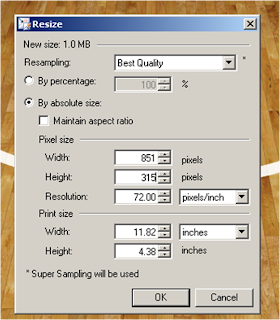
- Width: 851 Pixels (NOT Inches)
- Height: 315 (NOT Inches)
- Resolution: 100 PPI (Pixels Per Inch)
Here is the cover photo I created for my Facebook:
Notice, however, that you have to keep your profile picture in mind when designing your picture:
1. Decide on a background color or image. To use a solid color select the Paint Bucket and chose a color from the color spectrum and CLICK on white canvas to change color.
2. To use an image as a background OPEN the image in Paint.Net.
2. Re-size the image to 851 Width 315 Height. Be sure to make sure the box Maintain aspect ration is unchecked.
3. Open up 5 - 6 images you would like to have inserted into your Facebook Header.